WhatsApp templates
WhatsApp Business requires approved templates for any outbound message sent outside the 24-hour customer-service window. Templates are owned + approved by Meta; Zellbox mirrors them locally so operators can see what's approved without leaving the app and preview them with realistic per-language values.
The page splits into two tabs — Workflows (the default) and All templates — and a workspace-scoped language filter that narrows both tabs to just the locales your customers actually speak.
The language filter
A chip-and-dropdown picker sits above the tabs:
- Initial selection mirrors the same cascade Zellbox uses when picking a template for a real send: workspace default customer language → your UI language → English. So you first land on the locale your reminders actually go out in.
- Click
+ Add languageto widen the view. The dropdown lists every supported launch locale (12 today: English, Spanish, Portuguese-BR, Hindi, Indonesian, Italian, Catalan, German, French, Turkish, Arabic, Filipino). - Click the X on a chip to drop a language. The last chip can't be removed — you'd see a blank page otherwise.
- Saved per workspace in the browser. Re-opening the page restores the same selection.
Workflows tab
A workflow is a Zellbox-side trigger that fans out a WhatsApp template at a specific moment — the appointment-reminder fan-out is the main one today. Each card shows:
- The workflow's name + description.
- One row per language binding: which template Meta-approved template fires when a customer with that language gets reminded.
- A
+ Add languagebutton on the card to bind a new locale (only meaningful for tenants on their own WhatsApp Business number; shared-number workspaces inherit the platform bindings).
The appointment-reminder fan-out
Zellbox ships three approved reminder templates and picks one per fire based on the visit's shape:
| Visit shape | Template | Body slot used |
|---|---|---|
| In-person / phone, with a location | zellbox_appointment_reminder | header + body (with location pin) |
| Phone or virtual without a usable location | zellbox_appointment_reminder_simple | header + body (no location) |
| Virtual with a Google Meet link | zellbox_appointment_reminder_virtual | header + body + Google Meet button |
The three templates share five named variables: firstName, serviceLabel (the event title or default "appointment"), providerLabel (assigned manager or workspace name), whenLabel (localised — "avui a les 14:30" / "morgen um 14:30 Uhr" / …), and location (standard variant only). The virtual variant adds a sixth: meetCode (the Google Meet slug, slotted into the Join meeting URL button).
Zellbox auto-picks one of the three at fire time based on event.visitMode + whether a location / Meet link exists — the operator never has to choose. If the customer's preferred language isn't yet bound, the resolver cascades through workspace binding → platform binding → English fallback, so a customer always gets a message.
All templates tab
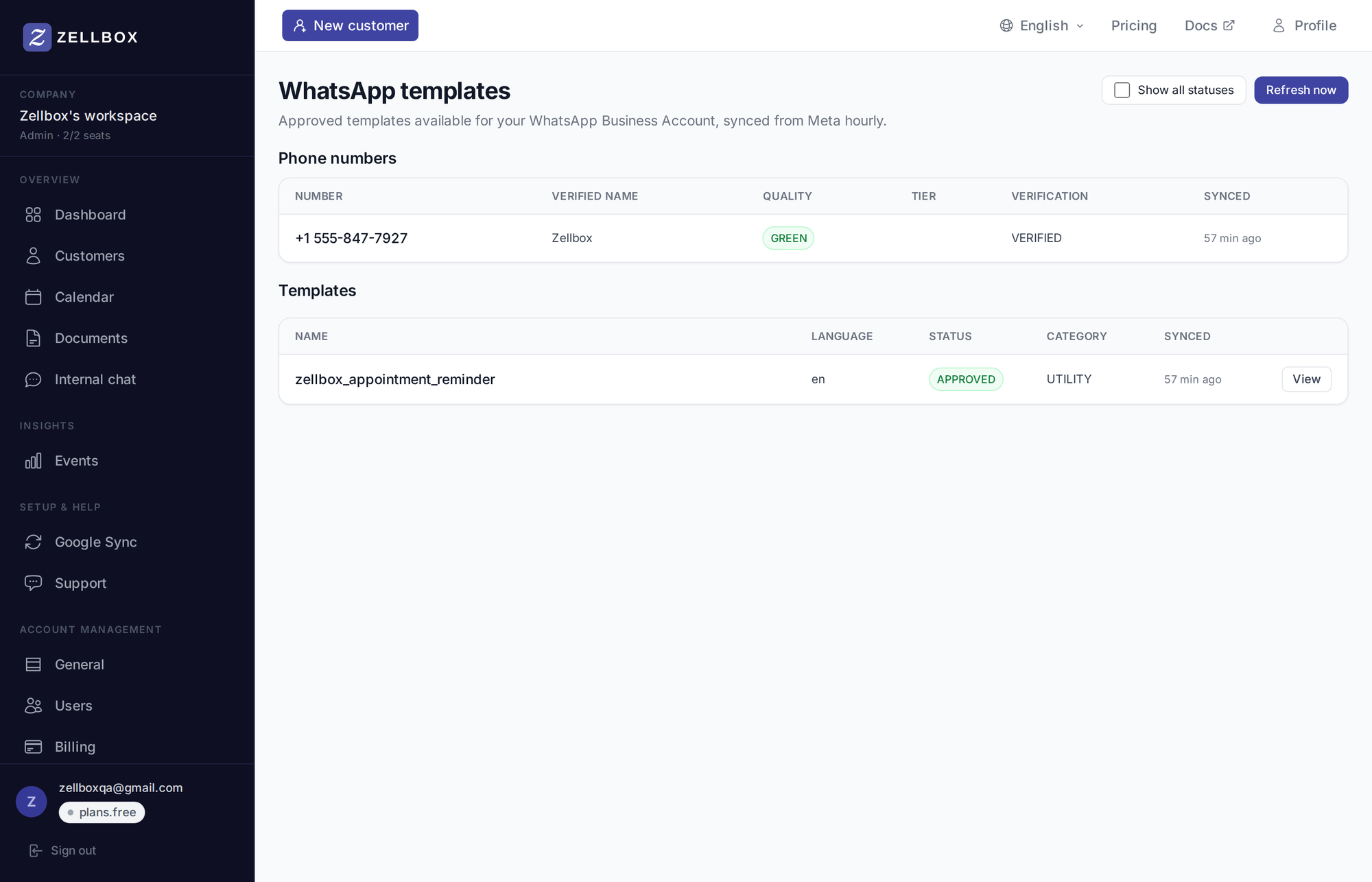
Lists every Meta-side template row for the workspace, one entry per (template name × language) pair, filtered by your language selection above. Columns:
| Column | What |
|---|---|
| Name | The Meta template name (e.g. zellbox_appointment_reminder_virtual) |
| Language | BCP-47 code (e.g. es, pt-BR, ca) |
| Status | APPROVED / PAUSED / REJECTED / PENDING / IN_APPEAL / DISABLED / DELETED. Only APPROVED can be sent |
| Category | UTILITY / MARKETING / AUTHENTICATION |
| Synced | Time of last Meta sync for this row |
A Show all statuses toggle reveals non-APPROVED rows (typically PENDING ones Meta is still reviewing).
Previewing a template
Click any row's eye icon to open the preview pane. The pane renders the template the way the customer's real WhatsApp client will — with the right per-locale sample values plugged in:
- Header in bold (e.g. Recordatorio para María in Spanish, Erinnerung für Sophie in German).
- Body with WhatsApp markdown parsed:
*bold*renders bold,_italic_italic,~strike~strikethrough. - Footer smaller and lower-contrast (e.g. Enviado por Zellbox).
- Buttons as tap-able chips below the bubble. URL buttons are clickable so you can verify the destination; phone-number buttons open
tel:; quick-reply buttons render inert with a hint explaining they're a customer-device action.
Sample values are locale-typical out of the box: María with "limpieza dental" and "la Dra. Pérez" for Spanish, Sophie with "Zahnreinigung" and "Dr. Müller" for German, etc. — so the preview reads exactly like a real reminder, not an English fragment spliced into a foreign sentence.
The same renderer drives the operator's WhatsApp chat popup on the customer detail page, so what you see here is what your operators see when they open a customer's thread.
Refreshing templates
Meta's approval pipeline runs async — once a new template is submitted (either by Meta-side staff for the platform fan-out or by your team for your own WhatsApp Business number), it can take minutes to days to approve. Zellbox auto-syncs hourly; admins can poke a manual refresh too:
- Open Templates → WhatsApp from the sidebar.
- Click Refresh now in the toolbar.
- Zellbox pulls the latest list from Meta. New templates show up; templates Meta has rejected or removed update their status.
Authoring new templates
Authoring new templates happens in Meta Business Manager (for tenants on their own WhatsApp Business number) — Zellbox cannot create templates on Meta's side. The platform fan-out templates above are Meta-approved by Zellbox staff and shared to every workspace on the Zellbox shared number; free-tier and not-yet-connected workspaces use those automatically.
Scripts are reusable WhatsApp templates — see Templates — WhatsApp scripts for the full editor.