Appearance
Sync status
The sync status page (/calendar/sync-status) is the history view for every calendar sync run Zellbox did for your account. It's the place to go when something seems off: "did the periodic sync run?", "why didn't yesterday's event show up?", "what did the safety guard just block?". Get here from:
- the Synced N ago label on the Calendar page,
- the View full sync history → link on a sync-quarantine banner,
- the View sync history → link under Google Calendar on the Google Sync page (
/google-sync), or - by opening
/calendar/sync-statusdirectly.
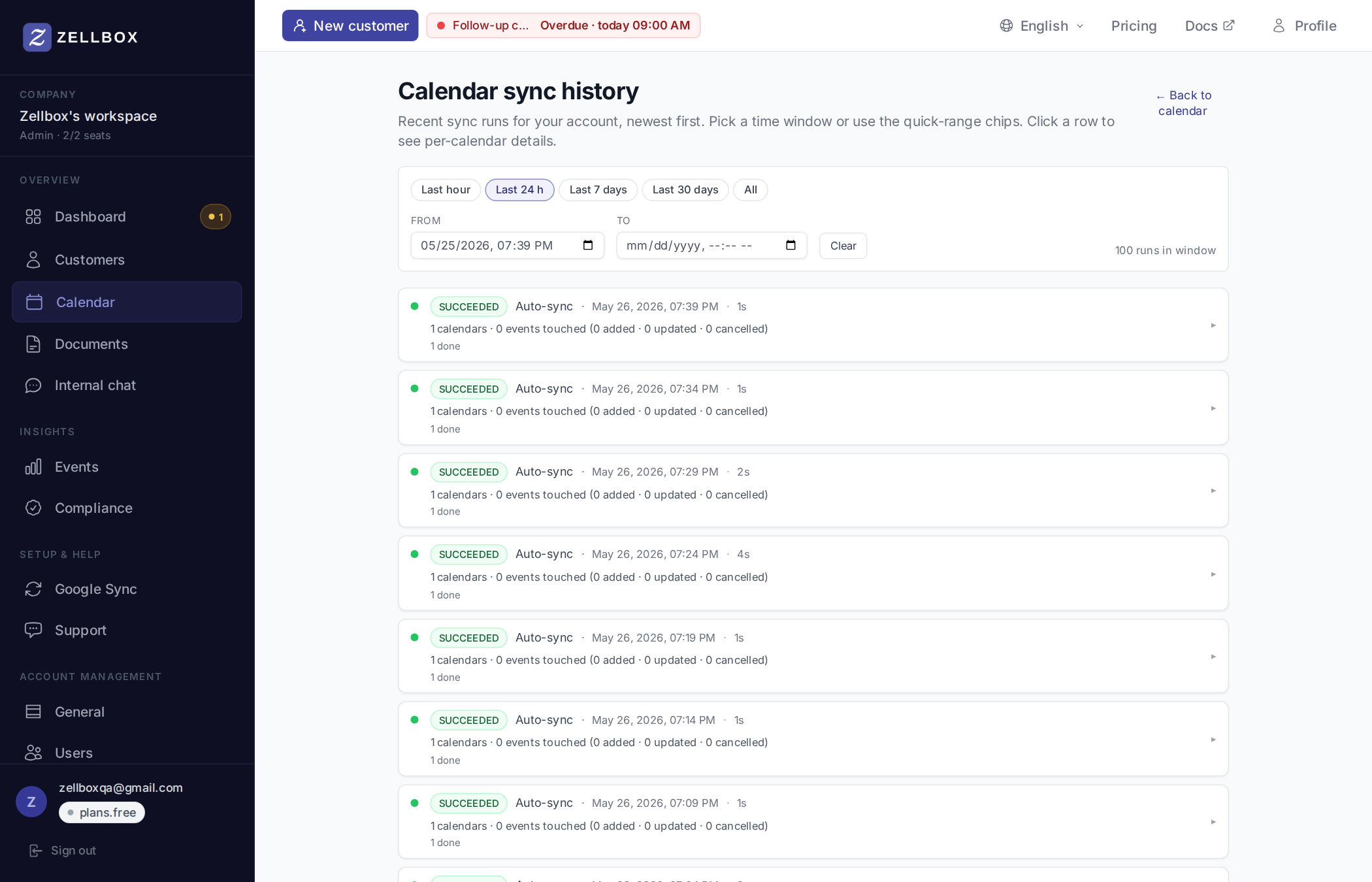
Picking a time window
A filter card at the top of the page narrows which runs are listed. Quick-range chips pre-set common windows; the From / To datetime inputs let you fine-tune either side; Clear drops both bounds. A {n} runs in window counter on the right tells you how many sync jobs matched the current filter.
| Chip | Window |
|---|---|
| Last hour | Now − 60 min |
| Last 24 h (default) | Now − 24 h |
| Last 7 days | Now − 7 days |
| Last 30 days | Now − 30 days |
| All | No bounds — capped at 100 results, newest first |
Each row is a status card:
✓ Succeeded · Refresh · 2 min ago · 24s · 12 calendars · 1,247 events touched (812 added · 311 updated · 124 cancelled)
  12 done
  ▸ Show calendar details
The colored dot + the status chip tell you the outcome at a glance:
| State | Meaning |
|---|---|
| Succeeded (green) | All calendar branches landed. |
| Partial (amber) | Some branches succeeded, some errored. Expand the row to see which. The row also shows a "held for review" count when the safety guard quarantined a cohort. |
| Failed (red) | Every branch errored. Usually means the OAuth token expired — re-connect Google. |
| Queued / Running (blue) | Job is in flight. Page auto-polls while any job is non-terminal. |
The row also shows the trigger source:
- Initial connect — the post-OAuth seed job that runs once when you connect Google for the first time.
- Manual refresh — you clicked the Refresh button on the Calendar page.
- Auto-sync — the 5-minute scheduled tick.
- New calendar added — you ticked a new calendar on the Google Sync page; Zellbox runs a one-off sync to seed it.
Under the headline, a second line summarises how the run's calendar branches are progressing — handy for telling an in-flight tick apart from a finished one without expanding the row:
8 done · 2 running · 2 queuedIf no per-calendar progress has been recorded yet (the safety net for the very first moments of a fresh run), the line reads No per-calendar progress recorded yet.
Per-calendar details
Click a row → expand to see the per-calendar breakdown. Each branch gets its own status icon + counts:
✓ primary               · 234 events synced
✓ Dr. Smith — Cardio    · 89 events synced
⚠ Shared — Pediatrics   · 47 cancellations held for review — [Approve]
✗ Dr. Lee — Dermatology · error: token expired (re-connect required)
Branches are sorted so quarantined and errored entries come first — the things that need your attention sit at the top.
Reviewing a quarantined cancellation
When the safety guard fires, you'll see a yellow banner on the Dashboard + Calendar pages:
⚠ 47 event cancellations on 1 calendar were held for review by the safety guard.
To resolve:
- Click Review on the banner, or open the Sync status page.
- Expand the row with the quarantined branch.
- Read the diagnostic: "X would-be cancellations · mirror size Y · reason". The reason explains why the guard fired:
on-seed— cancellations during an initial seed (suspicious; a fresh mirror shouldn't have anything to cancel).abs-limit— more than 25 cancellations in one run.pct-limit— more than 20% of the mirror was about to be cancelled.
- Click View held events → to expand the per-event list (see below). Scan to confirm the events look like a legitimate bulk cleanup rather than a connection mishap.
- Click Approve cancellations. The confirmation dialog has three blocks:
- What's about to happen: the count + the calendar id.
- Why the guard fired: a reason-specific explanation (the same
on-seed/pct-limit/abs-limitdistinction from step 3, but framed for the operator's decision). - Safety net: every event Zellbox is about to cancel is automatically snapshotted to the backup table first. You have 90 days to restore any of them individually from Recovery — restored events come back as Zellbox-only and aren't re-pushed to Google automatically.
- Click Apply cancellations. Zellbox spins a fresh single-calendar sync job with the guard bypassed for that calendar. Cancellations apply; you see the bypass job appear at the top of the history.
If you'd rather not approve — for example, you suspect a shared calendar's owner deleted everything by accident — leave the quarantine in place. The next clean sync will clear the slot automatically.
Held events drill-down
Below the diagnostic line, View held events → lazy-loads every event the safety guard refused for that one branch. Each row carries the title, start time (in workspace time zone), linked customer name when present, and a description preview.
The list distinguishes two kinds of rows:
- Matched events — Zellbox still has a mirror row for the event. Rendered as a white card.
- Ghost tombstones — Google reported
status: cancelledfor an event that's not in our mirror (almost always: a cancellation that happened before Zellbox was connected to this calendar). Rendered as a grey card with an italic "Google tombstone (no Zellbox record)" note.
The summary line above the list ("41 matched · 313 ghosts · total 354") shows the breakdown so a scary aggregate number gets deflated — most often the bulk of "354 cancellations" turns out to be ghosts that have no real impact.
Branches quarantined before this feature shipped show only aggregate counts (no per-event rows in the audit log). The empty state surfaces a Recover details from Google button that re-fetches the cohort from Google with the same seed window and writes the missing audit rows retrospectively. After it runs the list populates normally.
What the guard protects against
The safety guard exists to prevent a single sync hiccup from silently cancelling many events. Concrete failure modes it catches:
- Google returns a corrupt page where many real events appear as
status: cancelled. - A token swap or shared-calendar permission change makes Zellbox think the entire calendar is empty.
- A bug in our parsing marks healthy events as cancelled.
In any of these cases the guard refuses the whole batch and asks you to confirm before applying.