Questionnaires
Questionnaires are operator-fillable forms attached to a customer. Use them for intake, clinical-data capture, follow-up surveys — anything you'd normally do in a structured form.
A questionnaire lives at the workspace level as a template; an operator fills one per customer per occurrence, producing a completed questionnaire on the customer's profile.
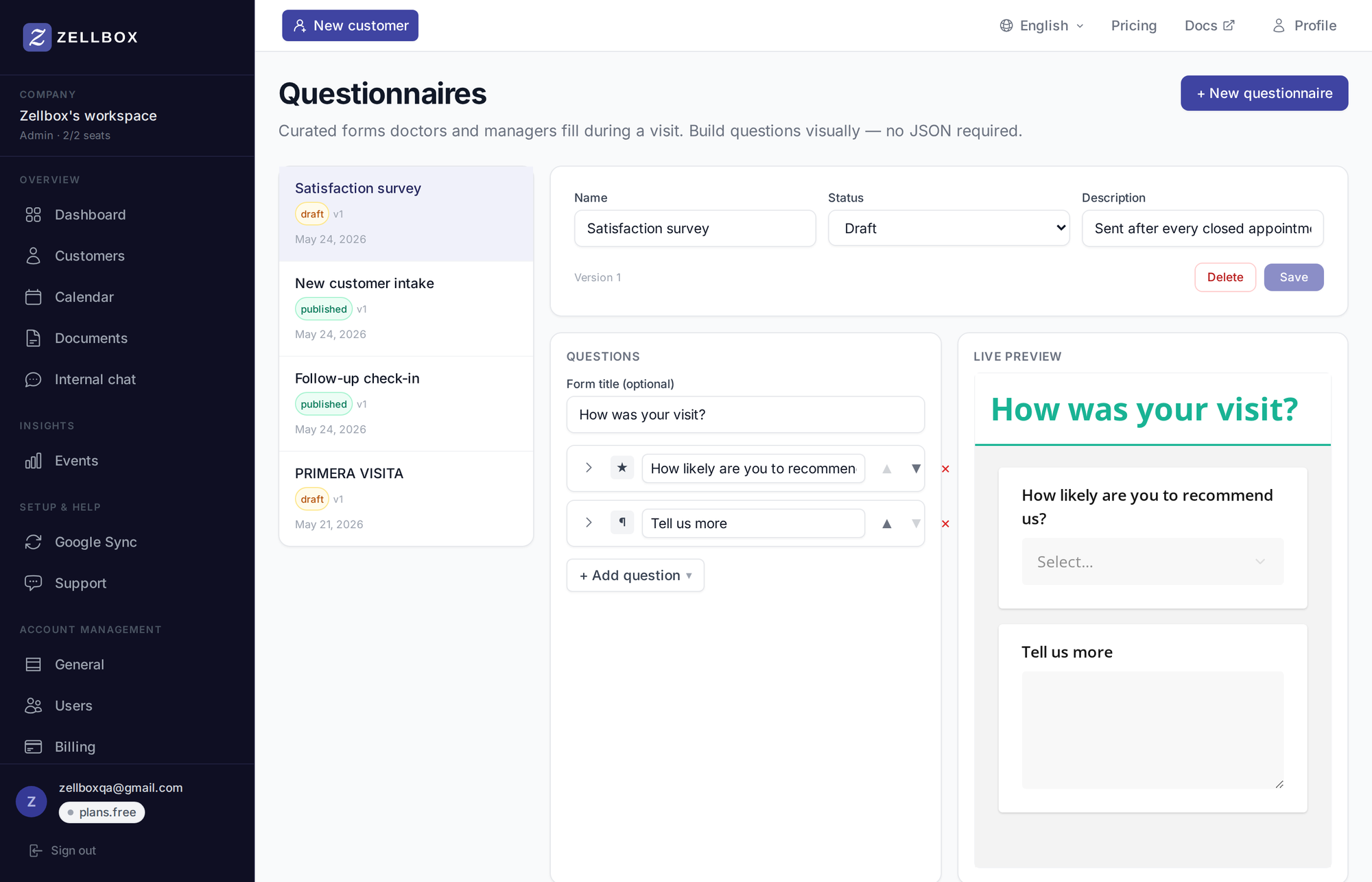
The builder is a thin layer over the SurveyJS JSON model — admins add/edit/reorder questions through a menu, backed by a live-preview pane that re-renders the form as you type.
Creating a questionnaire template
- Open Templates → Questionnaires from the sidebar.
- Click + New questionnaire.
- The new questionnaire opens in the right pane:
- Name — operator-visible label (e.g. "Initial intake").
- Description — what + when to fill.
- Status — draft / published / archived.
- Add questions from the builder. Supported types:
- Short text (single-line)
- Long text (multi-line)
- Number
- Date
- Yes/No (boolean)
- Rating (configurable max — 2 through 10)
- Single choice (radio)
- Multiple choice (checkboxes)
- Dropdown
- Save.
The live-preview pane on the right re-renders the form as you go so you can confirm the layout before saving.
Advanced types: Imported templates can include SurveyJS types the builder doesn't expose directly (panels, matrices, signature pads). They render as read-only "advanced" rows and round-trip on save.
Filling a questionnaire for a customer
The customer detail panel has a Questionnaires card. The "+ Add questionnaire" button opens a dropdown of published templates; the form opens in a SurveyJS runner, and on Submit the filled response is stored on the customer's profile.
Spreadsheet-style templates
Some workspaces use Excel-style spreadsheets instead of fielded forms (clinical worksheets, dosing logs). Those are managed under Documents — upload an .xlsx to the workspace scope and tick Use as template on the upload form. Operators fill a per-customer copy from the customer's "Filled spreadsheets" card.
The two systems coexist:
- Questionnaires — structured fields, captured as JSON, suited for reportable data.
- Spreadsheet templates — free-form Excel, stored as filled documents per customer.