Best WhatsApp signed-consent tools in 2026: GDPR-ready send-and-sign
Sending a consent PDF via WhatsApp, having the customer sign on their phone, and storing the signed file on the customer record — with an audit trail — is a narrow feature. Six tools that actually do it.
 by Nacho Coll
Nacho founded Zellbox to give appointment-driven small businesses — clinics, salons, spas, physio, aesthetics, vets, mental-health, and fitness studios — a WhatsApp-first calendar and customer record system.
Editorial disclosure: I work at Zellbox, so we rank #1 in this listicle. That’s the point of publishing our own — but every other tool is described accurately based on its public product pages as of July 2026. If you find a factual error, message me on LinkedIn. No affiliate links.
Signed consent via WhatsApp is a narrow feature. Most WhatsApp CRMs don’t ship it. Most document-signing platforms (DocuSign, PandaDoc, Adobe Sign) don’t natively route through WhatsApp. The intersection — WhatsApp-native send + phone-signed PDF + audit trail attached to the customer record — has maybe six credible answers globally.
This is the shortlist, in order of directness. GDPR (EU), LOPDGDD (Spain), and LGPD (Brazil) treat this workflow essentially identically; state-medical-board requirements in the US differ, and the HIPAA caveat below matters if you’re a US healthcare business.
The 4 things “signed consent via WhatsApp” actually requires
- A real signable PDF — not a form or a checkbox. Rendered from your own template, with the patient’s name / procedure / date pre-filled.
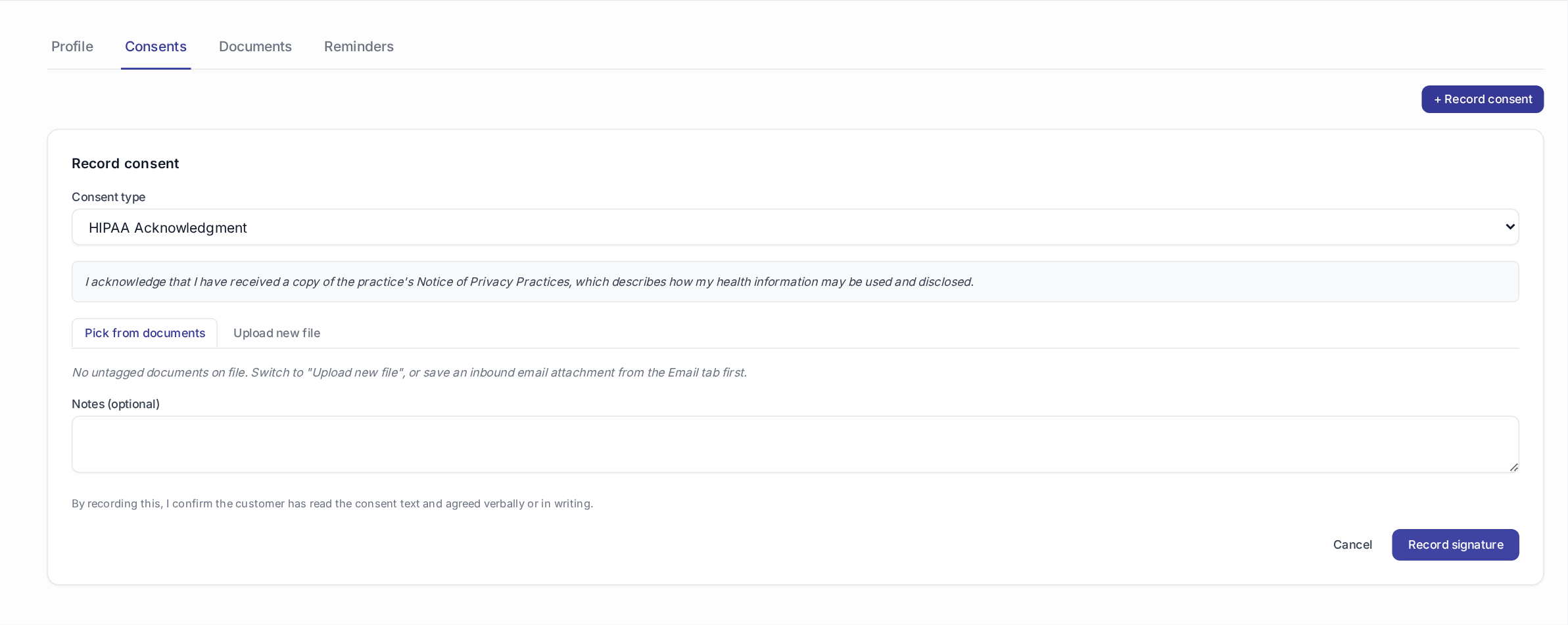
- Signature capture on the patient’s phone — most patients don’t have a printer. Drawing a signature with a finger on WhatsApp’s native attachment view isn’t a legal signature; a dedicated signing surface is.
- Audit trail — the signed PDF plus metadata (timestamp, signer identity, IP address, signature-render telemetry). Inspectors (AEPD in Spain, CNIL in France, ANPD in Brazil) ask for this specifically.
- Attached to the customer record — the signed file lives on the patient’s file, not in a shared Google Drive folder anyone can edit.
Tools that don’t hit all four are workarounds, not workflows.
The ranked list
1. Zellbox — native send-and-sign on WhatsApp, GDPR/LOPDGDD/LGPD-audited
Pricing: $0 Starter (2 seats, 50 customers) → $29/mo Pro (5 seats) → $99/mo Business (20 seats). Meta WhatsApp conversation cost passes through.
Fit: 1-25 person clinics, aesthetic centres, veterinary practices, physiotherapy, mental-health practices, salons offering treatments requiring informed consent.
Why #1:
- Send the consent PDF (your template, patient’s name and procedure pre-filled) via WhatsApp with one click from the customer record.
- Patient taps the link, signs with a finger on a dedicated signing surface (not a WhatsApp attachment view), submits.
- Signed PDF + timestamp + signer identity + IP + signature-render metadata all captured, all stored on the customer record.
- Insights → Compliance rollup shows who is missing what across the workspace, exportable to CSV.
- 12 locales — the consent PDF and the confirmation message both render in the customer’s preferred language.
- All within GDPR / LOPDGDD / LGPD scope — auditable per those regimes without additional tooling.
What it’s not: Not a general-purpose e-signature platform. You can’t use Zellbox to sign a rental agreement or a NDA — the workflow is scoped to customer-facing consent for appointment-driven services.
HIPAA caveat: Zellbox is not a HIPAA Business Associate today. For US healthcare requiring a signed BAA on the consent workflow, this is not the fit — use DocuSign (with a BAA) via SMS or email.
Try it: start free — no card.
2. DocuSign + WhatsApp Business API (custom integration)
Pricing: DocuSign eSignature Standard ~$25/user/mo. WhatsApp Business API via BSP ~$50/mo minimum. Middleware (Zapier / Make / custom) ~$20-50/mo.
Fit: Teams with technical resources who need DocuSign’s specific legal weight (US enterprise, cross-border contracts, notary integrations) delivered on WhatsApp instead of email.
Where it works: DocuSign is the gold-standard e-signature — enforceable in every jurisdiction that matters, HIPAA-BAA-signable for US healthcare, deeply audited. If your legal team specifies DocuSign, you’re using DocuSign.
Where it doesn’t: WhatsApp delivery is a middleware layer YOU own. You wire Zapier to: (a) trigger a DocuSign envelope on customer-record events, (b) grab the signing link, (c) send via Meta-approved WhatsApp template, (d) poll DocuSign for completion, (e) attach signed PDF back to your CRM. Two-week build, ongoing maintenance. For most SMBs this is over-engineered — the DocuSign BAA is only relevant for US healthcare, and for non-healthcare use cases the audit trail Zellbox ships is sufficient.
3. PandaDoc + WhatsApp (custom integration)
Pricing: PandaDoc Essentials $19/user/mo. WhatsApp via BSP as above. Middleware.
Fit: Same shape as DocuSign — teams with dev resources who prefer PandaDoc’s template UX to DocuSign’s.
Where it works: Better template designer than DocuSign, cheaper per user, HIPAA-BAA-signable on higher tiers.
Where it doesn’t: Same “you own the WhatsApp integration” problem. For appointment-driven SMBs, this is a heavier engineering commitment than the workflow warrants.
4. Adobe Sign + WhatsApp (custom integration)
Pricing: Adobe Acrobat Standard for teams ~$14.99/user/mo (includes basic Sign). Enterprise Sign tiers higher. WhatsApp middleware.
Fit: Teams already on Adobe Creative Cloud who want to consolidate.
Where it works: Deep Adobe integration, workflow builder, enterprise-grade signature capture.
Where it doesn’t: Same middleware-ownership pattern. Adobe’s WhatsApp story is nascent.
5. HelloSign (Dropbox Sign) + WhatsApp (custom integration)
Pricing: Dropbox Sign Essentials $20/user/mo. WhatsApp middleware.
Fit: Teams already on Dropbox who want basic signing without a full DocuSign contract.
Where it works: Simple product, decent template builder, competitive pricing.
Where it doesn’t: Same middleware problem. HelloSign / Dropbox Sign is optimised for email-first flows.
6. Native Meta WhatsApp Form templates (structured data collection only)
Pricing: Free with any WhatsApp Business API integration; per-conversation Meta cost.
Fit: Simple structured data — allergies list, contact update, appointment preference. Not consent.
Where it works: Meta’s Flows API lets you build a form-in-WhatsApp — patient fills fields, submits, data lands in your CRM.
Where it doesn’t: This is not a signed PDF. No signature capture, no legal-weight signature, no timestamped audit trail. Suitable for intake forms, not consent for restorative dental work or aesthetic procedures. Compliance auditors want the signed PDF, not a form submission.
Comparison table
| Tool | Native WhatsApp send | Signable PDF (not form) | Phone-signed | Audit trail | Attached to customer record | Integration complexity |
|---|---|---|---|---|---|---|
| Zellbox | ✅ | ✅ your template | ✅ dedicated surface | ✅ full | ✅ automatic | ✅ zero |
| DocuSign + WhatsApp | ⚠️ middleware | ✅ legal-grade | ✅ | ✅ | ⚠️ via middleware | ❌ high — you own it |
| PandaDoc + WhatsApp | ⚠️ middleware | ✅ | ✅ | ✅ | ⚠️ via middleware | ❌ high |
| Adobe Sign + WhatsApp | ⚠️ middleware | ✅ | ✅ | ✅ | ⚠️ via middleware | ❌ high |
| HelloSign + WhatsApp | ⚠️ middleware | ✅ | ✅ | ✅ | ⚠️ via middleware | ❌ high |
| Meta WhatsApp Forms | ✅ native | ❌ form, not PDF | ❌ no signature | ⚠️ form submission only | ⚠️ via API | ✅ zero — but wrong tool |
Which one should you pick?
- Appointment-driven SMB (dental, aesthetic, physio, veterinary, mental-health) needing GDPR/LOPDGDD/LGPD signed consent → Zellbox. That’s what we built for.
- US healthcare needing a HIPAA BAA on the signing workflow → DocuSign + WhatsApp middleware (or DocuSign via SMS/email; WhatsApp add-on is not required to meet BAA).
- Enterprise with existing DocuSign/PandaDoc contracts and a dev team → DocuSign/PandaDoc + WhatsApp custom if WhatsApp delivery matters. Otherwise stick with email delivery.
- Simple intake form only, no signed consent → Meta WhatsApp Forms natively, or a Google Form linked from a WhatsApp template.
The trap: buying DocuSign + building a WhatsApp middleware because you assume the “legal weight” of DocuSign is required — when GDPR / LOPDGDD / LGPD don’t specifically require it and Zellbox’s audit trail satisfies the same regimes. Talk to your DPO before committing to the more complex stack.
If you’re evaluating consent tools specifically for a GDPR audit, our 2026 GDPR checklist for private clinics walks through the 5 areas auditors check first, including where signed consent fits.
→ Try Zellbox free (no card): /signup → Full Zellbox compliance posture: /compliance → Related: GDPR + HIPAA checklist for clinics → Related listicles: Best WhatsApp appointment reminder tools 2026, Best WhatsApp CRM for dental clinics 2026
About the author: Nacho Coll is the founder of Zellbox. He writes about WhatsApp Business automation for appointment-driven small businesses.
Frequently asked questions
Why can't I just send the consent PDF via WhatsApp manually?
Does DocuSign work with WhatsApp?
Is a WhatsApp form (Meta's native form template) enough for consent?
Which one supports GDPR + LOPDGDD + LGPD in the same workflow?
Are these tools HIPAA-compliant for US healthcare?
About the author
Nacho Coll
Founder & Engineer at Zellbox
Nacho founded Zellbox to give appointment-driven small businesses — clinics, salons, spas, physio, aesthetics, vets, mental-health, and fitness studios — a WhatsApp-first calendar and customer record system. Writes about WhatsApp Business automation, no-show economics, recall-cycle playbooks, and the operational realities of running visit-driven businesses at scale.